
How to Mask the Aadhaar QR Code (Why Number Masking Alone Isn't Enough)
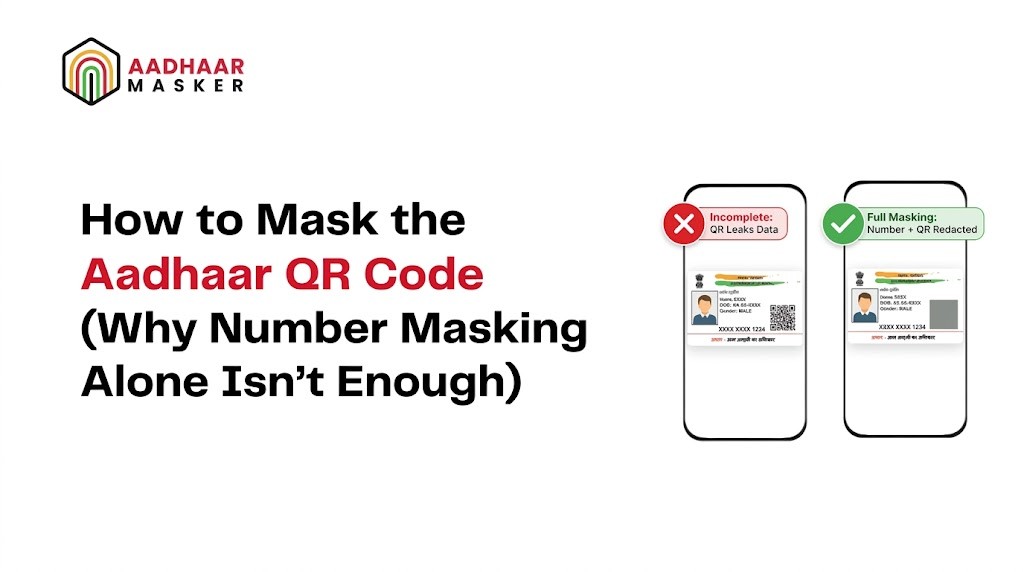
Most organisations that implement Aadhaar masking focus entirely on the printed 12-digit number. They black out the first eight digits, confirm that "XXXX-XXXX-XXXX" appears in place of the full number, and consider the job done. What they miss — and what regulators and security auditors are increasingly flagging — is the QR code printed on every Aadhaar card. That small square can decode to reveal the complete Aadhaar number and all associated demographic data in under a second, using nothing more than a free smartphone app.
Aadhaar QR code masking is the practice of redacting or obscuring that QR code at the same time as the printed number, so that neither the human-readable nor the machine-readable version of the identity data remains accessible on the stored document. This guide explains what the QR code contains, why number masking alone is a half-measure, and how complete aadhaar qr code masking works in practice.
What Does the Aadhaar QR Code Actually Contain?
Every Aadhaar card — both the physical card and the e-Aadhaar PDF — carries a QR code issued by UIDAI. The QR code is not a simple web link. It is a digitally signed data payload that encodes the cardholder's:
- Full 12-digit Aadhaar number
- Name as registered with UIDAI
- Date of birth or year of birth
- Gender
- Address including state, district, pin code, and street details
- A digitised photograph of the cardholder (in newer Secure QR codes)
- UIDAI's digital signature to verify authenticity
The Secure QR code introduced in recent years packs even more information than the original QR code format. Any application that can read a QR code can extract the text fields. The photograph and UIDAI signature require a UIDAI-compliant reader, but the Aadhaar number and demographic details are plain-text accessible to any generic QR scanner.
This means that a document where the printed number has been masked but the QR code is left intact is not a masked document in any meaningful sense. It is a document with a visible redaction and an unredacted machine-readable copy sitting right next to it.
Why Masking the Number Alone Leaves a Backdoor
The logic behind number masking is sound: if the Aadhaar number is not legible to a human reader, the document cannot easily be misused. But this logic breaks down as soon as the QR code enters the picture, for several reasons.
Any Smartphone Can Read It
Modern smartphones have built-in QR reading capability in the default camera app. A staff member, vendor, or bad actor with physical or digital access to a stored document does not need specialist tools to extract the full Aadhaar number from an unmasked QR code. They need three seconds and a camera. No IT skills, no hacking, no database access.
Digital Documents Are Especially Vulnerable
When Aadhaar documents are stored as scanned PDFs or image files, the QR code is preserved at full resolution. Any QR code reader software can process these files in batch, extracting the Aadhaar number and demographic data from hundreds of documents in minutes. An attacker who gains access to a document storage bucket does not need to read the numbers by hand — they can automate the extraction across the entire archive.
The Compliance Gap Is Real
UIDAI's guidance on masked Aadhaar is clear: the first eight digits of the printed number should be replaced with X's. But the same guidance that makes a masked Aadhaar valid for identity verification also implies that the stored document should not expose the full Aadhaar number through any channel. A document with an intact QR code fails this standard even if the printed number is correctly masked, because the QR code encodes the same data that masking is designed to protect.
Regulators auditing data handling practices are beginning to ask specifically whether QR codes have been addressed. An organisation that has masked the number but left the QR code intact will find it difficult to demonstrate that it has applied genuine data minimisation to its Aadhaar document holdings.
How Aadhaar QR Code Masking Works
Complete aadhaar qr code masking involves two coordinated actions applied to every incoming Aadhaar document: masking the printed number and redacting the QR code region. The methods differ depending on whether the masking is performed manually or through an automated system.
Detecting the QR Code Region
Before the QR code can be masked, it must be located on the document. On a standard Aadhaar card, the QR code appears in the lower right corner of the front face. On an e-Aadhaar PDF, its position depends on the version and whether the card is portrait or landscape. On photographed documents submitted through mobile apps, the angle, lighting, and cropping introduce additional variability.
AI-based document processing systems use computer vision to locate the QR code region regardless of these variations. The same models that detects Aadhaar numbers in scanned documents can simultaneously identify the QR code's bounding box. This is a critical capability because the QR code does not always appear in a predictable position — particularly in photographed or skewed documents.
Redacting the QR Code
Once the QR code region is identified, redaction replaces the pixel data in that region with a solid block — typically black or grey — that makes the QR code unreadable by any scanner. Unlike text redaction, which must be applied carefully to preserve surrounding content, QR code redaction simply overwrites the entire bounding box. The result is a visible rectangular block where the QR code used to be, confirming to any reviewer that the QR data has been intentionally removed.
The redaction must be applied to the underlying image data, not overlaid as a visible layer on top. A PDF that has a black rectangle drawn over the QR code as an annotation layer may look redacted on screen but remain fully readable — the QR code data is still present in the PDF's content stream beneath the annotation. Genuine redaction burns the block into the image at the pixel level so that the original QR data cannot be recovered by removing a layer or extracting the underlying PDF object.
Simultaneous Number and QR Masking
Both the number masking and the QR code redaction should happen in a single processing pass, applied to the document before it reaches your storage layer. A workflow that masks the number first and then sends the document to storage — planning to mask the QR code later — creates a window during which a partially protected document exists in your system. A fully integrated solution processes both elements together, and what reaches storage is already complete in its masking.
Manual vs Automated QR Code Masking
Organisations processing small volumes of Aadhaar documents sometimes attempt to handle QR code masking manually using image editing tools. A staff member opens each document in an image editor, draws a rectangle over the QR code, saves the file, and moves to the next. At low volumes this is feasible, though slow and error-prone. At the volumes typical of financial services, insurance, or telecom onboarding, it is not.
Why Manual Masking Fails at Scale
Manual QR code masking introduces several failure modes that automated solutions eliminate. Human reviewers miss documents — especially when under time pressure or processing large batches. They may incorrectly position the redaction rectangle, leaving a portion of the QR code readable. They may apply the redaction as an image layer rather than burning it into the pixel data, leaving the QR data technically recoverable. And they may fail to process documents that arrive in unusual formats — rotated, skewed, or embedded in multi-page PDFs.
A single missed QR code in a batch of ten thousand documents is enough to create a compliance gap. Manual processes cannot provide the consistency guarantee that a regulatory audit requires.
What Automated Masking Delivers
Automated aadhaar qr code masking systems apply consistent, auditable redaction to every document that passes through them. They process scanned images, PDFs, mobile photographs, and multi-page documents through the same pipeline. They produce an audit log confirming that each document was processed, what was detected, and what was redacted. And they do so at the speed of your onboarding volume — hundreds or thousands of documents per hour — without the fatigue and error rates that affect manual reviewers.
Aadhaar masking APIs that integrate with your existing document management systems can be configured to apply both number masking and QR code redaction in a single API call, returning the fully processed document ready for storage. Integration with KYC platforms, onboarding flows, and document management systems means that QR code masking happens automatically, without requiring staff to take any additional action.
What a Fully Masked Aadhaar Document Looks Like
A document that has undergone complete Aadhaar masking — covering both the printed number and the QR code — presents a specific visual appearance that you can verify:
- The printed Aadhaar number reads as "XXXX-XXXX-XXXX" or a similar format with only the last four digits visible.
- The QR code region is replaced by a solid rectangular block. The block typically matches the original QR code dimensions and is positioned where the QR code appeared on the original document.
- All other information on the card — name, address, photograph, and validity indicators — remains clearly legible. Masking targets the Aadhaar number and QR code specifically; it does not obscure the rest of the document.
- The document retains its evidential value as a record of identity verification. A reviewer can confirm that an Aadhaar card was presented, see the cardholder's name and photograph, and verify that masking was correctly applied — without being able to read the full Aadhaar number from either the printed field or the QR code.
This is the document format that UIDAI's concept of masked Aadhaar points toward: a usable identity record that does not expose the sensitive identifier itself. Stopping at number masking and leaving the QR code intact produces a document that looks correct to a casual reviewer but fails the technical standard that data protection regulations require.
Compliance Implications of Incomplete Masking
The compliance risk from leaving QR codes unmasked is not a theoretical concern. It becomes concrete in several regulatory scenarios that organisations face regularly.
DPDP Act Data Minimisation
The Digital Personal Data Protection Act, 2023 requires that personal data collected and stored be limited to what is necessary for the stated purpose. A stored Aadhaar document with an intact QR code contains the full Aadhaar number, name, date of birth, address, photograph, and UIDAI signature. None of these elements beyond the last four digits of the Aadhaar number are necessary to maintain an audit trail of identity verification. An intact QR code represents a significant excess of retained personal data, directly contrary to the data minimisation principle.
Aadhaar Act Storage Obligations
Entities storing Aadhaar information must implement security measures appropriate to the sensitivity of the data. A document stored with an intact QR code — from which the full Aadhaar number can be extracted with a free smartphone app — does not meet a reasonable security standard, regardless of the access controls applied to the document repository itself. If the document leaks, the Aadhaar number leaks with it.
Audit and Inspection Readiness
Regulatory inspections increasingly include technical reviews of document handling practices. An inspector who scans a stored Aadhaar document with a QR reader and retrieves the full Aadhaar number will treat the organisation's masking programme as non-compliant, even if the printed number was correctly masked. Demonstrating a genuinely complete masking process — covering both elements — is the only way to pass this test.
How AI-Powered Tools Handle Both Number and QR Code
The most effective approach to complete Aadhaar masking combines AI-based detection for both the printed number and the QR code region, followed by pixel-level redaction applied to both in a single processing step.
AI models trained on Aadhaar document formats can locate the printed number regardless of font, scan quality, or document orientation, and can simultaneously identify the QR code's position on the document. The same inference pass that detects Aadhaar numbers in scanned documents returns bounding boxes for both the number region and the QR code region. The redaction step then overwrites both regions, producing a document where neither element contains recoverable Aadhaar data.
This approach handles the full range of document formats encountered in real-world onboarding: high-quality scans, low-resolution mobile photographs, skewed or partially cropped documents, multi-page PDFs with the Aadhaar card on one page, and documents embedded within larger files. The AI handles the detection variability that manual processes cannot reliably address.
For organisations that have already deployed number masking and need to extend it to cover QR codes, the same API infrastructure typically supports QR code redaction as an additional capability rather than a separate implementation. Enabling it is a configuration change, not a rebuild — which makes the compliance upgrade straightforward for most teams.
Steps to Implement Complete Aadhaar QR Code Masking
If your organisation currently masks Aadhaar numbers but has not addressed the QR code, here is the practical path to closing that gap:
- Audit your existing document holdings. Identify whether stored Aadhaar documents contain intact QR codes. A sample review of your document repository will confirm the scope of the gap. If you are storing thousands of documents with unmasked QR codes, you will need a batch reprocessing run to bring the archive into compliance.
- Evaluate your masking tool for QR code capability. If you are using an existing Aadhaar masking solution, check whether it includes QR code detection and redaction. Many earlier tools addressed only the printed number. If the capability is absent, you will need to upgrade your tooling or switch to a solution that provides complete masking.
- Integrate QR masking into your ingestion pipeline. Configure your document processing workflow to apply QR code redaction at the point of ingestion — the moment a document enters your system — so that nothing is stored without complete masking. Do not rely on a downstream step that may be missed.
- Verify redaction quality. Test that the redacted QR code blocks are genuinely unreadable. Pass the masked documents through a QR scanner and confirm that no data is returned. Verify that the redaction is burned into the pixel data and not applied as a removable overlay.
- Update your masking policy documentation. Your written data handling policy should explicitly state that Aadhaar masking covers both the printed number and the QR code, and describe the technical method used for each. This documentation supports your compliance posture in regulatory inspections.
Conclusion
Aadhaar QR code masking is not an optional enhancement to a number masking programme — it is the completion of it. A masked Aadhaar document that still carries an intact QR code is not masked in the sense that matters for data protection compliance. The QR code encodes the full Aadhaar number and demographic data in a format that any smartphone can read in seconds, making the visible redaction of the printed number largely symbolic.
Complete masking requires addressing both elements: the printed number and the QR code. AI-based masking tools that detects Aadhaar numbers in scanned documents — alongside the QR code region — and redact both in a single processing pass deliver the level of protection that UIDAI's intent and India's data protection regulations require. If your current masking workflow covers only the number, closing the QR code gap is the most important compliance step you can take next.
For organisations looking to implement or upgrade their masking capabilities, automated masking across PDFs, images, and scanned documents provides the consistent, auditable protection that manual processes cannot match at scale.
Top Posts
- What Does the Aadhaar QR Code Contain?
- Why Masking the Number Alone Leaves a Backdoor
- How Aadhaar QR Code Masking Works
- Manual vs Automated QR Code Masking
- What a Fully Masked Aadhaar Document Looks Like
- Compliance Implications of Incomplete Masking
- How AI-Powered Tools Handle Both Elements
- Steps to Implement Complete QR Code Masking
- Conclusion